
I'm Building a Browser for Reverse Engineers
February 13, 2026
• Veritas
In the expanding world of AI my heart still lies in AST transforms, browser fingerprinting, and anti-bot circumvention.
 This article may have been republished from another source and might not have been originally written for this site.
Preamble
In the expanding world of AI my heart still lies in AST transforms, browser fingerprinting, and anti-bot circumvention. In fact, that's the majority of this blog's content. But my workflow always felt... primitive. I was still manually sifting through page scripts, pasting suspicious snippets into an editor, and writing bespoke deobfuscators by hand. Tools like Webcrack and deobfuscate.io help, but the end-to-end loop still felt slow and manual. I wanted to build a tool that would be my web reverse-engineering Swiss Army knife
If you're just curious about what it looks like and don't care about how it works then here's a quick showcase:
Humble Beginnings
My first idea was simple: make a browser extension. For an MVP I wanted to hook an arbitrary function like Array.prototype.push as early as possible and log every call to it.
Hooking functions in JavaScript
In JavaScript, it's trivial to hook into and override existing functions because you can reassign references at runtime. A common pattern is to stash the original function, replace it with a wrapper that does whatever instrumentation you want, and then call the original so the page keeps behaving normally:
1const _origPush = Array.prototype.push;
2Array.prototype.push = function (...args) {
3  console.log('Array.push called on', this, 'with', args);
4  return _origPush.apply(this, args);
5};
Here's what that looks like in Chrome's devtools:
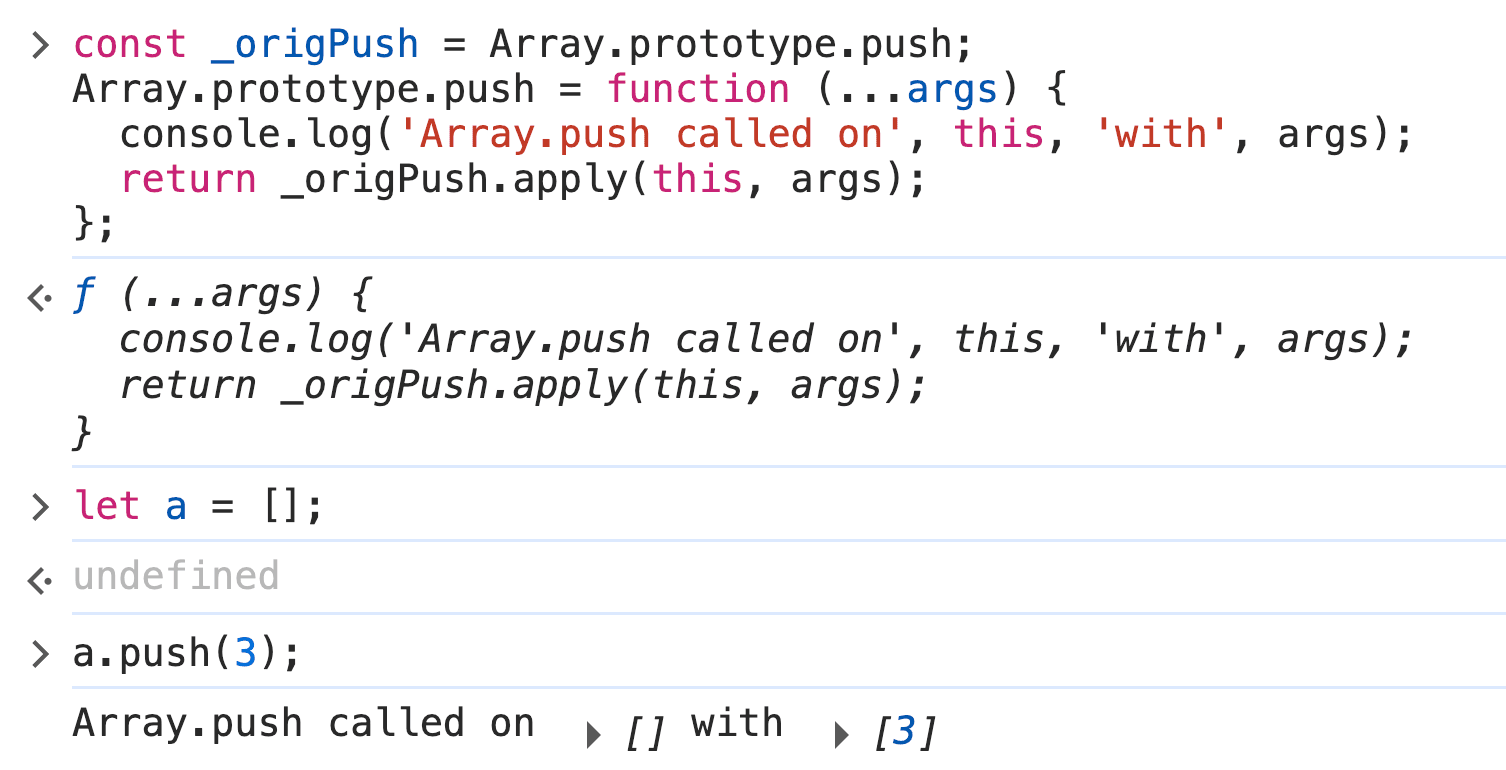
This technique should make it pretty straightforward to build a Chrome extension that hooks arbitrary global functions on page load and surfaces calls in a small UI.
Content Scripts
Chrome's content scripts are files that run in the context of web pages, which we can use to install our hooks early.
The idea is simple, we create a content script that runs at document_start that injects a tiny bit of code that replaces Array.prototype.push with a wrapper that logs and then calls the original.
1{
2 "name": "My extension",
3 "content_scripts": [
4   {
5     "run_at": "document_start", // Script is injected after any files from css, but before any other DOM is constructed or any other script is run.
6     "matches": ["<all_urls>"],
7     "js": ["content-script.js"]
8   }
9 ]
10}
111const _origPush = Array.prototype.push;
2Array.prototype.push = function (...args) {
3 console.log('Array.push called on', this, 'with', args);
4 return _origPush.apply(this, args);
5};Running this on a page that clearly used Array.push gave me... absolutely nothing. At first, I thought it had to be an execution order issue. Maybe my hook was loading too late? But after another read through the docs, I found this painfully obvious note staring me right in the face:
“Content scripts live in an isolated world, allowing a content script to make changes to its JavaScript environment without conflicting with the page or other extensions’ content scripts.”
In hindsight, of course that makes sense. Still, it sucked. I wasn’t ready to give up yet, though. I had a potentially clever workaround: injecting a <script> tag directly into the page with my hook inside. But, naturally, it could never be that easy.
I knew if I wanted to get this done, I would have to go down a layer.
Editor's Note: Some readers have kindly pointed out to me that this is actually possible to accomplish from an extension. However, the custom browser approach still has benefits explained later in the post :-)
Chrome Devtools Protocol
The Chrome DevTools Protocol (CDP) is the low-level bridge for instrumenting, inspecting, and debugging Chromium-based browsers. It’s what automation tools like Selenium and Playwright use under the hood. CDP exposes a large set of methods and events split across domains. The docs publish a convenient, comprehensive list of them.
While reading the domains, one method jumped out: Page.addScriptToEvaluateOnNewDocument. Its description "Evaluates given script in every frame upon creation (before loading frame's scripts)" sounded like exactly the hook we needed: run code before the page’s own scripts so we can win the prototype race.
To prove the idea I built a tiny test: a page with a script that pushes a secret value into an array, and a CDP-injected hook that tries to observe that push. If the hook sees the secret, the technique works. I chose to prototype this using Electron. I could have spoken directly to the browser over raw CDP, but Electron made wiring up a UI, IPC, and a quick demo app way faster for a weekend PoC.
1const { app, BrowserWindow } = require("electron/main");
2
3function createWindow() {
4  const win = new BrowserWindow({
5    width: 800,
6    height: 600,
7  });
8
9  const dbg = win.webContents.debugger;
10  dbg.attach("1.3");
11  // Enables the Page domain so we can run the script on new document command after
12  dbg.sendCommand("Page.enable");
13  dbg.sendCommand("Page.addScriptToEvaluateOnNewDocument", {
14    source: `(() => {
15        const _origPush = Array.prototype.push;
16        Array.prototype.push = function (...args) {
17            console.log('Array.push called on', this, 'with', args);
18            return _origPush.apply(this, args);
19        };
20})();`,
21  });
22  win.webContents.openDevTools();
23  win.loadURL("file:///Users/veritas/demo/index.html");
24}
25
26app.whenReady().then(() => {
27  createWindow();
28});
29
The result?:

It worked! I knew this PoC could take me far. I could hook any arbitrary global function or property and log (or spoof!) arguments and return values. The next step was building a user interface around it.
Since this started as a fun weekend project, I wanted the fastest path to a working demo. In true open-source fashion I searched for “electron web browser” and stumbled across electron-browser-shell by Samuel Maddock.
That project gave me an address bar, tabs, and a basic IPC-ready shell bridging the webview environment and my browser UI.
From there I added a sidebar that would display hooked function events as they fired.
To make things more interesting I needed to hook more than Array.push. A favorite target of fingerprinting scripts is the Canvas API. Sites can draw a static image to a <canvas>, call toDataURL() (or read pixel data), and use the resulting hash to fingerprint your GPU using subtle rendering differences. By correlating canvas hashes with other signals (user agent, installed fonts, etc.), trackers can build a surprisingly robust fingerprint. Watching and optionally spoofing these kind of calls is extremely useful for this kind of RE work.
The result looked as follows:
I was pretty happy with the direction the project was taking. The PoC actually felt useful. Remembering my previous work reverse-engineering TikTok’s web collector and how aggressively those collectors scrape client-side signals, I couldn’t resist testing the hook there. I fired up the demo, pointed it at TikTok, and watched the UI for activity.
The site was pulling a decent amount of telemetry. Canvas calls (like toDataURL), WebGL stats, font and plugin probes, and other subtle signals that, when combined, paint a detailed fingerprint. Seeing those calls appear in my sidebar made this project feel immediately worthwhile.
I even made sure to include all canvas operations in a secrion of the detail pane to be able to recreate a canvas if necessary.
I wanted to run this against more anti-bots. Out of curiosity I pointed the demo at a site using Cloudflare’s Turnstile. I knew Turnstile was collecting various browser signals, but to my surprise, my sidebar showed nothing. Why was I seeing zero logs?
OOPif(S) I did it again
Cloudflare renders the Turnstile widget inside a sandboxed iframe tucked into a closed shadow root. This iframe is an OOPIF (out-of-process iframe). It lives in a different renderer process so page-level scripts (and our injected hooks) simply won’t run there, thus, no logs.
